
Every major tech breakthrough right from AI models, cloud platforms, or chip design has one thing in common: They all are built to analyze, move and make sense of data accurately and faster. This proves that it is necessary to choose the right BI tool as it contributes to the growth strategy.
Both Looker Studio and Power BI offer powerful ways to visualize, explore, and understand data. However, they cater to different audiences, solve different problems, and operate within different ecosystems.
Let’s take a look at how these platforms have differ in features, value, user experience, integration capabilities, and use-case suitability.
What is Looker Studio?
Looker Studio is Google’s free, browser-based business intelligence tool that enables users to create interactive dashboards and reports. It’s particularly effective for those who are already using Google products such as Google Analytics, Google Ads, BigQuery and Google sheets.
The tool is useful and popular among marketers, small business owners, and analysts who need quick and visual data insights and who lack deep technical knowledge. The latest update in Looker Studio, it comes with real-time exploration using BigQuery’s semantic layer, ability to add multiple customizable visual components and supports third-party connectors for platforms like Salesforce, MySQL, and PostgreSQL.
What is Power BI?
Power BI is used for data modeling, reporting, and analytics. It integrates smoothly with Excel, SharePoint, Teams, Azure, and SQL Server, making it a strong fit for mid-sized and enterprise-level businesses especially those already using Microsoft tools. The recent updates in Power BI such as Copilot- an AI-powered report generation using NLP, Tighter integration with Microsoft Fabric and Enhanced role-level security, data governance for enterprises makes it strategically smart.
Key Differences: A Functional Comparison between Looker Studio vs Power BI
1. Integration Capabilities
| Feature | Looker Studio | Power BI |
| Google Workspace | Native integration | Via third-party tools |
| Microsoft 365 | Limited, via connectors | Seamless integration |
| BigQuery | Native and optimized | Available, less seamless |
| Excel | Through upload or connectors | Deep, native support |
| SQL Databases | With partner connectors | Native connectors |
| Cloud Support | Google Cloud | Azure, AWS, Google Cloud (via connectors) |
If you business heavily relies on Google services choose Looker Studio and if your business is deeply embedded in the Microsoft ecosystem then Power BI is ideal.
2. User Experience and Learning Curve
- Looker Studio offers a simple and easy to use drag-and-drop interface which can be handled by non-technical users also.
- Power BI, is beginner-friendly at the surface, and has a steeper learning curve for advanced features such as DAX (Data Analysis Expressions) and Power Query.
So, If you need an easy way to analyze data then, Looker Studio is better suited. For more control and analytical depth, Power BI has more to offer especially for experienced users.
3. Customization and Visualization
- Looker Studio provides Flexible visual components which are ideal for marketing and performance dashboards.
- Power BI supports advanced visuals, drill-down capabilities, and custom visuals from its marketplace.
If you are planning to have rich and interactive dashboards with customization, then Power BI stands out. Though Looker Studio is easy to use but it is simple and sufficient for standard visualization model.
4. Data Manipulation and Modelling
- Looker Studio offers basic data manipulation features which includes calculated fields and simple data blending. But, it lacks advanced transformation capabilities, that means data preparation needs to be done in Google Sheets, BigQuery, or other source systems.
- In contrast, Power BI provides robust tools for data manipulation and modeling. Data manipulation and modelling is possible with Power Query and DAX.
5. Performance with Large Datasets
- Looker Studio can’t handle large, complex datasets hence might experience performance limitations.
- Whereas, Power BI Premium is designed to handle big data with features including incremental refresh, data compression, and aggregation features.
If your business requires handling large-scale, enterprise-grade data processing, then Power BI offers reliable performance.
6. Collaboration and Sharing
Looker Studio is easy to share with links similar to sharing a google doc. This is a better option for quick collaboration and offers commenting option. However, it lacks deeper controls like role-based access and version history.
Power BI brings enterprise-level collaboration with Microsoft Teams integration, real-time co-authoring, version control, and detailed workspace permissions. It is designed for secure, large-team environments.
7. AI and Automation
- Looker Studio lacks in built-in AI, which demand connecting it to tools like BigQuery ML to get similar results, which adds complexity.
- In terms of AI, Power BI has a clear edge here with features like Copilot, Smart Narratives, and Anomaly Detection. AI assistance makes data analysis faster and smarter without the need of coding.
8. Security and Governance
- Looker Studio includes basic access controls and sharing permissions using Google accounts.
- Power BI features advanced security, including- Row-level security, Data encryption, and Microsoft Purview integration for data governance
For businesses or organizations with strict compliance needs, Power BI is the stronger option as it provides advanced security.
The Winner: Power BI
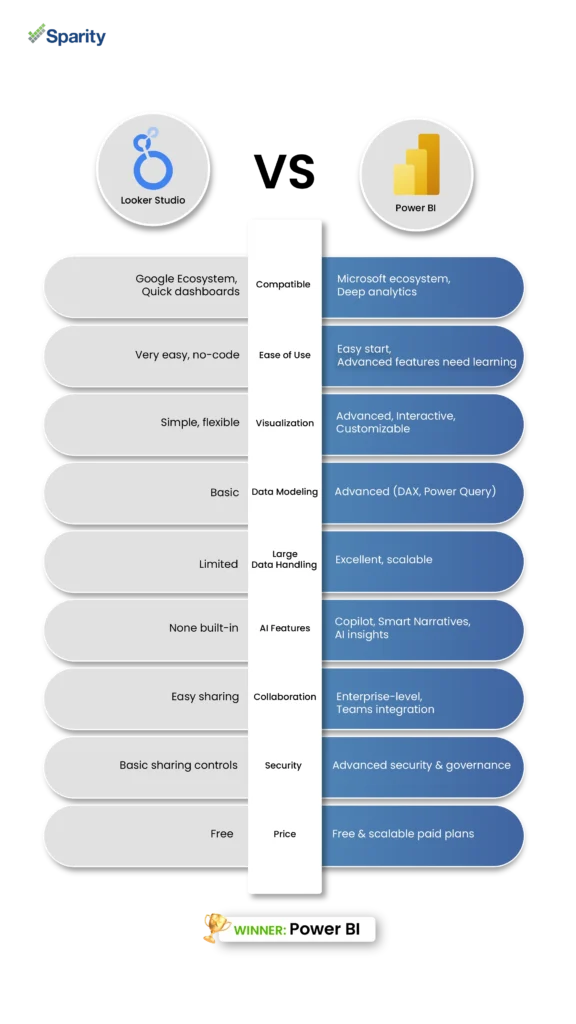
Though both Looker Studio and Power BI serve different user needs, Power BI stands out as the more powerful and versatile tool especially for businesses that deal with complex data, requiring advanced analytics, or operating at scale.
But, if you are looking for a simple, budget-friendly dashboard and work within Google ecosystem then Looker Studio can be your pick. But if your business is already invested in Microsoft tools, or need deep data modeling, AI-driven insights, and enterprise-grade collaboration, then Power BI is the future-ready choice.
Why Choose Sparity for Power BI Implementation?
If you’ve decided Power BI is the right fit, Sparity is here to turn your data into decisions. With deep expertise in Microsoft technologies, we help businesses set up powerful BI systems that are scalable, secure, and customized to your needs. Right from data modeling to dashboard design and AI-driven insights, we’ll help you get the most out of Power BI without the hassle.
Let Sparity help you make Power BI work for you.