Businesses invest in BI migrations hoping to have a BI tool that saves them time, effort and money. These hopes can shatter when planned BI migrations fail. Most BI migrations fail even with a solid plan in place when the execution and BI migration approach are underestimated. BI migrations also fail when you fail to identify all the dependencies and especially the hidden ones.
What Is a BI Migration Approach?
A BI migration approach is the methodology of moving data, schemas, semantic layers, and reporting dashboards from a legacy business intelligence tool to modern BI tool like Power BI.
The BI migration approach cannot be mistaken as strategy or BI checklist. The BI migration strategy is high level planning of migration, and checklist is a step-by-step process of migration whereas BI migration is more of the technical ‘how’ of moving assets from one BI tool to another.
This article is all about the BI migration approach and looking for dependencies that may risk your BI migration failure.
Why Traditional BI Migrations Fail
BI migrations are strategic shifts that organizations undertake. However, when treated just as a software upgrade, migrations fail miserably. Hidden dependencies, user adoption failures and technical blind spots can turn out to be potential reasons for traditional BI migrations failures.
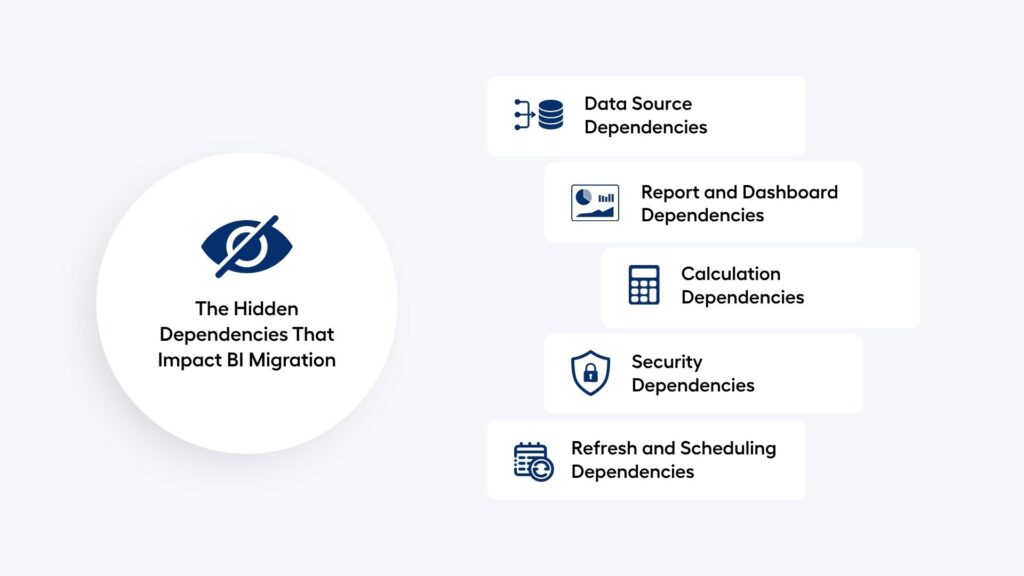
The Hidden Dependencies That Impact BI Migration
Managing dependencies is the process of understanding the migration process, anticipating dependencies, and having a plan to counter them. However, there are a few dependencies that lie low away from your sight. Let’s discuss these dependencies and develop a BI migration approach to counter them within time.
Data Source Dependencies
Data source dependencies are the foundational core of legacy BI assets that contain dashboards, semantic layers, databases, and data warehouses. These must be mapped correctly to the new BI tool where you are migrating. Failure to do this can lead to inaccurate data which can have a huge impact on end user reports or insights. Embedded custom SQL, local excel reports, or shadow calculations may come out as tough to spot.
Report and Dashboard Dependencies
Report and dashboards are the final product or visual lineage of raw data. Hidden filters, or visuals dependent on each other can be tough to spot. Linked reports, shared datasets, and embedded dashboards can count as hidden dependencies, so you be careful about these when migrating.
Calculation Dependencies
Legacy BI tools have different logics or calculations compared to modern BI tools. Calculation dependencies represent the dense web of business logic, formulas, and metric definitions that must be translated from your legacy platform to the new architecture. Hidden dependencies could be applying logic to a report or dashboard outside of the semantic layer. When planning BI migration, you may miss these as these are not included in your regular dashboards.
Security Dependencies
Security dependencies represent the rigid legal, compliance, and user-access frameworks that control who can view sensitive information. These security structures must be completely mapped and re-engineered in the target platform.
Hidden security dependencies involving user groups, RLS, and AD integration occur when data access rules silently rely on unmapped identity attributes or mismatched technical configurations.
Refresh and Scheduling Dependencies
Refresh and scheduling dependencies are set to update only after upstream data pipelines; data warehouses, and semantic layers have finished processing. These can occur when you have untracked cross-database processes or undocumented system level processes. An example could be emailing subscriptions which may not be documented and, in most cases, go unchecked.
Why Dependency Analysis Should Be the First Step
Dependency analysis maps out how reports, raw models, and dashboards connect to data sources. Doing this prevents overdoing things and also prevents broken reports or dashboards.
Before rebuilding reports, organizations should understand:
- What the report connects to
- Who uses it
- How often it’s used
- What business process depends on it
Identify dependency visibility and migration risk with risk matrix and accordingly plan your BI migration approach.
| Dependency Visibility | Migration Risk |
| High | Low |
| Medium | Moderate |
| Low | High |
A 5-Step BI Migration Approach
From data discovery to rollout, you need a solid BI migration approach with careful execution for a successful modernization of your business intelligence tool.
Step 1: Discovery & Inventory
Go through the data inventory and scan your existing BI footprint.
- Catalog reports – Deploy automated meta data scanners to catalog all existing reports, semantic models, and underlying ETL pipelines.
- Usage Audit – Extract user logs to identify heavily used enterprise assets versus abandoned or duplicate reports.
Step 2: Dependency Mapping
- Data lineage analysis – Trace end to end data lineage from source database to individual dashboard tiles.
- Report relationships – Discover different reports and their relationships with different data sets or sources.
- Security mapping – Map legal, compliance, and user-access framework dependencies.
Step 3: Migration Assessment
Classify assets and catalog them into one of these:
- Retire – The assets that are no longer required can be retired, so put them into this category
- Replace – In case, some important assets need logic changes or structural changes, you can replace those required changes and migrate
- Consolidate – Reports or assets that can be combined to form a single unit should be united to declutter the ecosystem.
- Migrate: For the ones that are to be migrated without any changes, can be done using the lift and shift method.
Step 4: Pilot Migration
This can act as proof of concept for enterprise rollout of your datasets.
- Select low-risk assets – Start with low-risk assets to make it faster and feel confident about BI migration
- Validate outputs – Ensure complete technical compatibility between your legacy BI tool and modern BI tool by using verification loops.
- Gather feedback – Stay coordinated with the team and gather timely feedback from the team to refine the process even further.
Step 5: Enterprise Rollout
- Wave-based deployment – Mitigate risk by transitioning business units, data layers, and reporting inventories in logical, managed increments.
- Governance – Establish strict architectural boundaries and permission frameworks to prevent the new BI platform from becoming disorganized like the legacy system.
- Change management – Minimize user friction and drive platform adoption across all business units through structured support systems.
Migrate from Tableau to Power BI and save up to 70% cost
How AI Is Changing BI Migration Approaches in 2026
10 years ago, BI migration meant a big step where organizations had to risk a lot as it would take years of manual rebuilding of reports, and dashboards. This hard work also did not guarantee success.
The BI migration is quite opposite in 2026 with the advent of AI. BI migration can now be completed in months instead of years with very short room for failure – all thanks to AI.
AI-driven agentic workflows, automated semantic mapping and pre-migration footprint reduction have assisted migration in the best possible way.
AI migration tools like BIPort from Sparity help accelerate this shift from years to months by automating asset discovery, formula conversion, and dashboard replication.
Conclusion
Successful BI migration isn’t about moving reports. It’s about understanding the dependencies behind them. Organizations that adopt a dependency-first BI migration approach can reduce risk, accelerate decision-making, and modernize analytics with greater confidence. Migrate from your legacy BI tool to Power BI with Sparity for faster, cost-efficient migration.
FAQs
What is BI migration?
Migrating from your legacy business intelligence tool to modern tools like Power BI or any other BI tool is referred to as BI migration.
What is the BI migration approach?
The approach while planning BI migration, which could be first analyzing dependencies or going straight into BI migration can be called as BI migration approach.
We can identify hidden dependencies by running data lineage tools to map data flows or query and audit logs from current BI platform.
How much time should be allocated to dependency discovery?
20-30% of time can be dedicated to dependency discovery as these can cause problems in the migration process.
Ignoring hidden dependencies can cause project delays, budget overruns, and security gaps.